Physical inventory counts: a ghost in the numbers got fixed
Version of Monday, August 31, 2026This version fixes something that never looked like a bug: a physical count done correctly could end up putting stock into the system that never existed.
The ghost: count correctly, end up with inflated inventory
The count compared what was counted against the system quantity at the moment you confirmed it, not against the quantity that existed when you started counting. Between those two moments the business kept selling, and that sale quietly worked its way into the adjustment.
A real example:
- 8:00 AM — the system shows 50 units on hand. Products are loaded for counting.
- 8:30 AM — the shelf is counted: 48. Two short, as expected.
- During the day, 12 more units sell. With those sales deducted, the system now shows 38.
- 5:30 PM — the count is confirmed. The system compares 48 (what was counted) against 38 (what it shows now) and calculates not a shortage, but a surplus of 10. Ten units get added to inventory that were never in the stockroom.
The dangerous part is that nothing looks wrong. A regular stock-in entry comes out, with its own note and its own user, just like any other, and the inventory balances against itself. No warning shows up anywhere. The later in the day the count got confirmed, the bigger the ghost, because more had sold in between.
Now the count freezes the system quantity the moment it’s opened, and adjusts against that number no matter how much sells in the meantime. Same example: it opens at 50, you count 48, and whenever you confirm — any time of day — the system deducts the 2 that were missing and leaves inventory at 36. If your business has been using physical counts, it’s worth checking whether a recent count may have inflated your inventory for this reason.
It’s now its own module
Physical counts are no longer a tab inside Inventory — they get their own section in the menu: Physical Count. The list of counts no longer gets wiped out once confirmed, so you can go back and answer “what got counted in July, and who counted it” without having to remember it.
The new module shows up in the menu after logging back in.
The count can now be audited
Three new things make the count trustworthy, not just fast.
Blind counting, a checkbox when the count is opened: while counting, the screen hides the quantity the system has on record. If the person counting sees the “expected” number beforehand, they tend to count toward that number instead of counting what’s actually there.
Recount: when something doesn’t add up, those lines can be sent to a second round without erasing the first one. Both counts are kept and can be compared side by side.
Per-line tolerance: set an amount above which the system won’t let you close the count without recounting that line. It’s what stops an expensive typo — 5 instead of 50 — from going straight into inventory unnoticed.
On top of that, the screen flags products that had sales, stock-ins, or transfers while the count was open, so you know which ones deserve a closer look before confirming.
PDF report and who’s allowed to close it
On confirmation, the system generates a printable physical count report in PDF, ready to sign, with three lines: “Counted by”, “Adjustment authorized by”, and “Date”.
There’s also a new permission in Roles, “Close physical count”, that separates counting from authorizing the adjustment: one person can count without being able to confirm the difference. It comes turned on for every role that already had access to the module; turn it off from Administration › Roles when the business wants those to be two different people.
Scan-and-go capture
The code field keeps focus and returns to it on its own after every scan, so you can sweep the stockroom with the barcode gun in one go, without touching the screen between products. Every scan is tagged with the name of whoever made it, so more than one person can count the same sheet at the same time without stepping on each other.
Cycle counting: a little every day
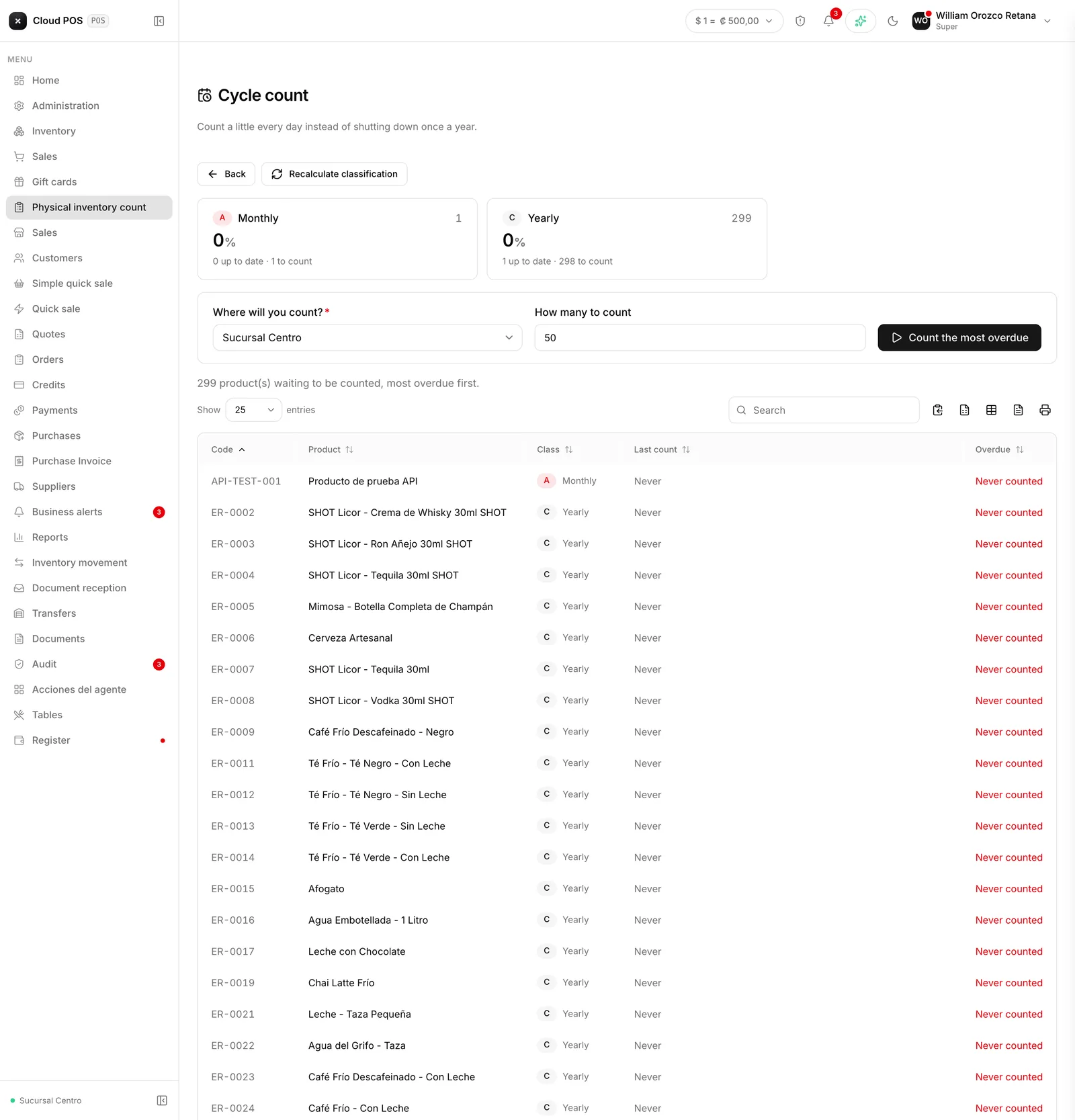
The alternative to shutting the business down one day a year to count everything: the system classifies products into A, B, and C by how much money they move, not how many units — a thousand bottle caps for soda move fewer colones than ten bottles of liquor, even though they move more units, because losing one bottle hurts a lot more than losing one cap. A products get counted monthly, B products quarterly, and C products once a year.
The cycle counting screen shows what’s due today and how much of the cycle is already done, so you can keep chipping away at it without ever stopping sales.
Worried a past count may have inflated your inventory? Reach out and we’ll go over your adjustment history together.